
After an instrument-training session in a simulator, you may wonder whether the time can count toward your instrument rating or is simply practice. The distinction matters when students track rating requirements and instructors record training given.
This guide explains how FAA-approved devices differ from home simulators, what authorization means, and how to document AATD sessions. It also clarifies the Part 61 credit limits and how instructors should classify simulator instruction, so you can plan training and keep records that accurately reflect each session.
Key Takeaways
- Learn how approved AATD sessions may contribute toward an instrument rating, within the applicable limits.
- Understand why a home flight simulator and an FAA-approved training device don’t qualify for the same credit.
- See what device details and training records to keep in your logbook.
- Find out how instructors should record ATD instruction given separately from flight time.
- Explore how structured instrument-rating training can help you apply simulator work toward your pilot certification goals.
Does Simulator Time Count Toward Your Certificate?
In the United States, time in an approved training device may count toward a certificate or rating, within applicable limits. The device’s authorization, the training conditions, and the curriculum determine what credit applies.
Certificate and Rating Credit
An aviation training device (ATD) is a ground-based simulator approved for specific training and credit. Eligible device time may reduce some required aircraft training, but it does not become airplane flight time.
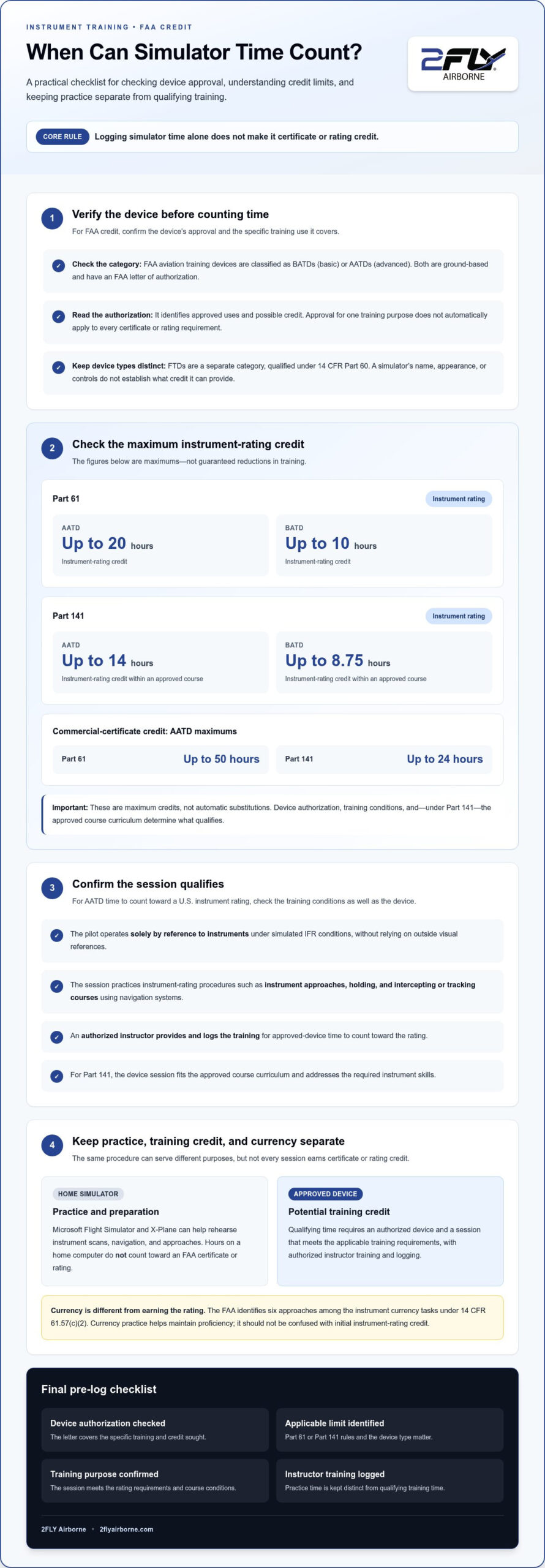
Limits differ by certificate and training rules. Under Part 61, an AATD may provide up to 50 hours of commercial-certificate credit. Under Part 141, an AATD may provide up to 24 hours of commercial-certificate credit. These are maximum credits, not automatic substitutions; the applicable curriculum and device authorization determine what training qualifies.
For instrument training, the key question is whether the device and session meet the rating’s requirements. Logging time alone does not establish that it counts toward a certificate.
Instrument Credit Under Part 141
Part 141 instrument credit is simulator time applied within an approved flight-school course. Under Part 141, an AATD may provide up to 14 hours of instrument-rating credit, while a BATD may provide up to 8.75 hours.
The course structure matters. Device sessions must fit the curriculum, and the training must address the required instrument skills. A session outside those conditions does not become course credit simply because it involves instrument procedures. The curriculum determines how AATD sessions may count toward the rating.
Instrument Credit Under Part 61
Part 61 permits instrument-rating credit from qualifying ATD training within specified limits. According to the Federal Aviation Administration, an AATD may provide up to 20 hours of instrument-rating credit under FAA Part 61. According to the Federal Aviation Administration, a BATD may provide up to 10 hours.
Any stated credit limits are maximums, not guaranteed reductions for every student. The training must take place in an eligible device and meet the rating requirements. When planning aircraft lessons, remember that device time can support instrument preparation but does not replace every required training experience.
Loggable AATD Tasks and Procedures
For AATD time to count toward a U.S. instrument rating, the pilot must operate solely by reference to instruments under simulated IFR conditions. In practice, that means conducting the session without relying on outside visual references while practicing instrument procedures.
Logged work may include instrument approaches, holding procedures, and intercepting or tracking courses using navigation systems. An authorized instructor must provide and log training for approved-device time to count. This gives the session a defined training purpose and connects the procedures to the instrument-rating curriculum.
Instrument currency is separate from earning the rating. The Federal Aviation Administration identifies six approaches among the instrument currency tasks under 14 CFR 61.57(c)(2). Currency practice can help maintain proficiency, but it shouldn’t be confused with credit toward the initial instrument rating.
Consumer simulators versus FAA-approved training devices
A desktop flight simulator can help you rehearse procedures, but practice value and certificate credit are different things. For FAA credit, the device must be approved for the training and credit sought.
Consumer software supports practice, not certificate credit
Microsoft Flight Simulator and X-Plane can help you review instrument scans, navigation, and approach sequences at home. But a home computer running either program does not provide time loggable toward an FAA certificate or rating. The software can help you prepare for a lesson, but its hours cannot replace qualifying training in an approved aviation training device.
That distinction is practical. You might rehearse an instrument approach at home, then fly it with an instructor in an approved device or aircraft. The first session builds familiarity; the second may meet training-credit requirements if the device, instructor, and lesson qualify.
What makes a training device FAA-approved?
The FAA divides aviation training devices into basic aviation training devices (BATDs) and advanced aviation training devices (AATDs). Both are ground-based and have an FAA letter of authorization. That letter identifies the device’s approved uses and the credit it may support.
A simulator’s appearance or controls do not establish its approval. Before claiming credit, check whether its current FAA letter of authorization covers that credit. Authorization is specific, so approval for one training purpose does not mean the device is approved for every certificate or rating requirement.
How devices differ from flight training devices
Flight Training Devices (FTDs) are qualified under 14 CFR Part 60. They’re a distinct category from BATDs and AATDs, which hold letters of authorization. Higher-level FTDs add more aircraft-specific simulation features: Level 6 and higher devices include an aerodynamic model validated to flight-test data and full-envelope control loading.
These categories matter because a label such as “flight simulator” does not tell you what credit applies. The device’s qualification or authorization, not its marketing description, determines how it can be used in training.
Match the session to the training purpose
An approved device can support instrument practice, currency, and proficiency in defined ways. It cannot replace every airplane task: an AATD alone cannot complete an instrument proficiency check involving a circling approach, landing, or multiengine tasks. Those require skills the device cannot fulfill on its own.
Use a home simulator to rehearse flows and procedures, then apply them in structured training. For credit, an authorized instructor must provide and log the session in an authorized device. Keep practice hours distinct from creditable training time.
FAA simulator classifications and authorization
An AATD and BATD are aviation training devices, while an FTD follows a separate qualification framework. Unlike aircraft time, device time is ground-based and counts only toward credit the device is authorized to support. Its category and approval determine its role in instrument training.
Three classifications, different approval paths
The FAA divides aviation training devices into basic aviation training devices (BATDs) and advanced aviation training devices (AATDs). Both are ground-based and have an FAA letter of authorization, or LOA. The letter describes the device and the training uses it can support.
Flight Training Devices (FTDs) are qualified under 14 CFR Part 60. They’re not simply another name for an AATD. Level 6 and higher FTDs add an aircraft-specific aerodynamic model validated to flight-test data and full-envelope control loading. These features distinguish the device’s qualification level, but the label alone doesn’t establish what credit applies to a particular training requirement.
Why the letter of authorization matters
The LOA is the practical reference for deciding whether an AATD or BATD can support the instrument training you log. Its terms link a specific device to approved training uses. When comparing simulators, compare their authorizations rather than relying on cockpit appearance, software, or a general “FAA-approved” description.
Approval has a defined scope. A device authorized for particular instrument work is not necessarily authorized for every certificate task or proficiency activity. Before applying simulator time to a requirement, match the device’s current LOA to the credit sought and the training conducted.
Compare device time with aircraft time
Aircraft time involves operating an aircraft; ATD time records training in a ground-based device. Each supports instrument learning differently. A simulator provides a controlled setting for procedures, while aircraft lessons develop those skills in flight. They are separate logbook categories.
BATDs and AATDs also have different credit limits. This comparison concerns allowable hours, not identical equipment or training experiences. The device’s specific approval remains central.
Apply the classification before logging
Use a clear sequence: identify whether the device is a BATD, AATD, or FTD; review its applicable authorization or qualification; then match the session to your instrument-training objective. For example, record an AATD approach session as device training, not aircraft flight.
This distinction helps pilots and instructors keep training records accurate. An FTD’s Part 60 qualification, an ATD’s LOA, and an aircraft lesson each describe different training environments. The right classification shows what the session was and whether its time can count toward the intended requirement.
Logbook documentation and instructor signatures
Common recording mistakes include entering AATD time as airplane flight, exceeding the device’s approved credit, or failing to describe the session’s purpose. These errors can make the record unclear and leave claimed instrument-rating credit unsupported.
Keep device time distinct
Record ATD time in a separate logbook column labeled for the device, such as AATD or BATD. Do not include it in airplane flight time, total flight time, or PIC time. A simulator session is device training, not time operating an aircraft.
For each session, enter the date, device identification, duration, and remarks describing the work. Record the approaches in the appropriate approach field, and note simulated instrument time when applicable. Identify the simulated aircraft’s make and model, but do not use aircraft-only fields to make device time look like airplane experience.
For example, record a session practicing an instrument approach in the device log, with the approach and training details documented. Do not record it as actual instrument meteorological conditions. The device provides simulated conditions, not actual IMC.
Record instructor-provided training accurately
An authorized instructor who provides ATD training may record the time as ATD or AATD dual-given time. Keep it separate from flight instruction given, and exclude it from flight time, total flight time, and PIC time. This accurately distinguishes simulator training from aircraft instruction.
The instructor should document the session’s training content and provide the applicable endorsement for training received. The pilot’s and instructor’s records should describe the same device session, duration, and instrument work. Clear remarks connect the logged approaches or procedures to the training completed.
Separate training credit from currency
Instrument-rating credit and instrument currency serve different purposes. Under 14 CFR 61.57(c), instrument currency concerns recent instrument experience, while rating credit concerns qualifying training toward the rating. A pilot should label the activity accurately rather than treating every simulator approach as rating credit.
For currency, the Federal Aviation Administration identifies six approaches among the tasks in 14 CFR 61.57(c)(2). AATD sessions used for currency still need accurate records of the approaches and other tasks completed. Don’t assume that currency activity automatically qualifies as training credit toward an instrument rating.
Understand the signature requirement
For training credit, an authorized instructor must provide and log the ATD training. Instrument-currency sessions have a distinct recordkeeping history: 2018 amendments to Part 61 removed the requirement for an instructor to observe and sign the logbook verifying an ATD currency session. That change doesn’t turn device time into flight time or erase the need for accurate entries.
Before presenting a logbook for review, compare each entry with the device type, session content, and applicable credit. Correcting a mislabeled entry early is easier than explaining an unclear record during an instrument-rating review.
AATD instrument-rating time limits under Part 61
Part 61 determines how approved-device training can be applied to an instrument-rating requirement. The practical challenge is tracking eligible AATD sessions separately from practice that develops skills but doesn’t qualify as credit. A simple running record helps pilots plan training without treating every simulator session alike.
Apply the Part 61 credit ceiling
Yes, qualifying AATD time can count toward the instrument-rating experience requirement, within Part 61’s device-credit ceiling. The important planning step is distinguishing time completed from time eligible to be applied. A pilot may log a session for training purposes while separately tracking whether it qualifies toward the rating requirement.
For a useful progress review, list each session’s device, training objective, and credit status. Compare the eligible credit accumulated with the applicable limit. This helps you identify which future sessions build skills and which may still contribute toward the rating’s required experience.
Understand how credit affects the training plan
Simulator credit changes how you may satisfy a requirement, not the nature of the experience recorded. Your training plan should show both the regulatory requirement and the qualifying device credit applied to it, while keeping aircraft experience separate.
For example, when reviewing progress with an instructor, separate completed AATD procedures from aircraft lessons still needed for the planned course. This supports better scheduling and avoids assuming that every hour of practice has the same effect on certification progress.
Evaluate whether a session qualifies
Before counting a session toward the rating, assess the training record as a whole. The device must be authorized for the credit sought, the session must meet applicable training conditions, and the instructor’s record must reflect the training provided. A duration entry alone does not establish that these elements align.
Use the same review when planning your next simulator lesson. Identify the rating objective, confirm the session suits that objective, and record the outcome clearly. This creates a traceable connection between the training and the requirement it may help satisfy.
Keep progress tracking useful
AATD simulator time loggable for an instrument rating should be tracked as eligible credit, not automatically counted just because it appears in a logbook. Keep a separate running tally of applied device credit and reconcile it with your training plan during progress reviews.
That tally can guide planning for your next lesson. If the applicable device credit has been fully applied, further simulator practice may still support learning, but plan it for its training value rather than counting it again toward the requirement. Clear records keep those purposes distinct.
2FLY Airborne: FAA Professional Pilot Program
2FLY Airborne’s FAA Professional Pilot Program connects structured flight training with a progression through key pilot certifications. If you’re planning to earn an Instrument Rating (IR), the program offers a path that also includes the Private Pilot Certificate (PPL) and Commercial Pilot Certificate (CPL).
Understanding AATD credit is one part of planning your training. A clear course sequence helps you track simulator sessions, aircraft experience, and logbook records against the requirements for each stage. Consider the FAA Professional Pilot Program when you’re ready to map your instrument training into a broader professional goal.
Contact 2FLY Airborne or visit 2flyairborne.com to learn more.
Turn Simulator Practice Into Confident Instrument Flying
Knowing when AATD simulator time is loggable for an instrument rating gives you a stronger foundation for planning. Treat each simulator session as deliberate preparation for real cockpit decisions. Set an objective before training, then reflect afterward on which procedures felt consistent and which need more focused practice.
This habit connects instrument scan, navigation, and procedure management in a disciplined approach to flight training. Organize your learning, build skills progressively, and use instructor feedback to guide your next practice. Strong preparation comes from steady, purposeful work, not simulator hours alone.
As you plan your aviation training pathway, consider how structured certification training can support your long-term goals. Explore pilot training options with 2FLY Airborne and take the next step toward developing as an instrument-rated pilot.
Frequently Asked Questions
As a flight instructor, can I log “instruction given” when teaching in an ATD?
Record ATD teaching as device instruction given, not airplane flight instruction. For example, if you teach a student to brief and fly an approach in an AATD, describe it in your record as AATD dual-given time. Keeping the device category visible distinguishes ground-based instruction from aircraft teaching when you review experience or prepare a logbook summary.
Does training in an ATD count towards my total time?
No. Keep ATD sessions out of your total flight-time figure. When preparing a logbook summary, maintain separate totals for aircraft experience and device training rather than combining them. If an application or training review asks for aircraft time, report that total and list simulator training separately so the record accurately describes each type of experience.
How much approved-device time can I count?
The allowable amount depends on the certificate or rating and whether training follows Part 61 or Part 141. For example, instrument-rating limits differ between those training paths, and commercial-certificate credit has its own limits. Treat the applicable course and device authorization as a pair: a limit for one certificate or curriculum shouldn’t be used to calculate credit for another.
If home sim time does not count, why use a sim at all?
Home simulation can help you arrive at a formal lesson with a focused question. You might rehearse an instrument scan and notice where your attention drifted during a simulated approach. Bring that observation to your next lesson and ask your instructor to focus on the underlying skill. The home session supports preparation; the instructor-led session develops and assesses your training.
What is an AATD simulator and how is it FAA approved?
An AATD is an advanced aviation training device, a ground-based simulator authorized for specified training uses. Its FAA letter of authorization identifies the device and permitted credit. Keep a current copy of the letter with your training records for review, so a reviewer can compare the device used with the authorization supporting the credit claimed.
How many AATD simulator hours can count toward an instrument rating?
Under Part 61 in the United States, an AATD may provide up to 20 hours of instrument-rating credit, according to the Federal Aviation Administration. That figure is a ceiling, not a target or automatic allowance. For planning, track sessions that meet the applicable conditions separately from extra simulator practice, so your progress tally reflects credit eligible for the rating.
What are the FAA instrument rating aeronautical experience requirements for simulator time?
The stated minimum is 40 hours of instrument flight time, with qualifying device credit allowed within applicable limits. For an AATD session to reduce the hours required for a U.S. instrument rating, the pilot must operate solely by reference to instruments under simulated IFR conditions. A lesson plan should connect each session to instrument procedures and the relevant rating requirement.
What instructor supervision or endorsement is required for logging AATD time?
An authorized instructor must provide and log ATD training for approved-device credit. Keep the session record specific enough to show what the instructor taught and what the pilot practiced. Instrument-currency sessions are a separate case: 2018 amendments to Part 61 removed the requirement for an instructor to observe and sign the logbook for an ATD currency session. Don’t apply that currency rule to training-credit records.
Article by
2FLY Airborne
2Fly Airborne is a professional flight training organization dedicated to developing the next generation of skilled, confident, and safety-focused pilots. With decades of combined aviation experience, our team of certified instructors provides structured, real-world training designed to prepare students for both checkrides and long-term success in the aviation industry.
Content Disclaimer
Some blog content is generated with the assistance of automated tools and may not always be fully accurate or up to date. Please verify all aviation-related information with official sources or a certified instructor. For additional guidance or clarification, we encourage you to contact one of our training advisors at 2Fly Airborne.