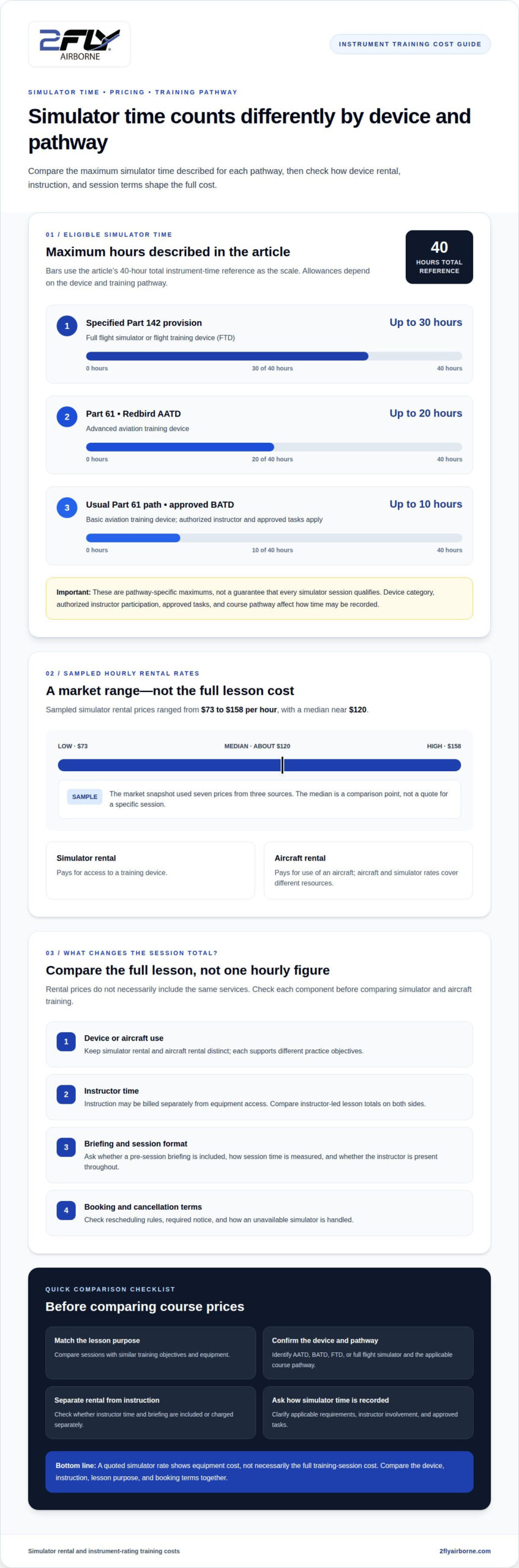
What should you budget for simulator time while working toward an instrument rating? Understanding flight simulator rental hourly pricing for instrument students starts with separating the simulator’s hourly rate from the full cost of a training session. Across the market, sampled hourly rental rates typically range from $73 to $158, with a median of about $120.
The hourly rate is only part of the picture. Simulator type, instructor involvement, and booking terms all affect the total. This guide explains what shapes rental costs, how simulator sessions fit into instrument training, and how to compare pay-as-you-go rates with course packages. Use these factors to assess practice costs and plan training around your goals.
Key Takeaways
- Compare simulator and aircraft training by looking at what each session includes, not just the hourly rental rate.
- Understand how approved simulator time may count toward instrument-rating requirements and why the device and training pathway matter.
- See how simulator sessions can build proficiency in instrument procedures and avionics before applying those skills in the aircraft.
- Weigh pay-as-you-go training against course packages by considering scheduling, instruction, and how costs are structured.
- Clarify whether simulator access and instructor time are billed separately so you can understand the full cost of a session.
How Much Does It Cost To Rent A Flight Simulator Per Hour?
Market samples put simulator rental between $73 and $158 per hour, with a median near $120. Aircraft rental and simulator rental cover different training resources, so compare the complete lesson cost, not just the equipment rate.
Simulator and Aircraft Hourly Costs
A simulator hourly rate covers use of a training device; aircraft rental covers use of an aircraft. An instrument lesson may use both for different practice objectives, so keep the two charges distinct when comparing costs.
The sampled simulator market range is $73 to $158 per hour, based on seven prices from three sources collected November 19, 2026. A median near $120 offers a useful midpoint for comparison, not a quote for a specific session.
Aircraft rental costs vary with aircraft type and rental terms. A Cessna 172 lesson, for example, uses an aircraft at an airport, while simulator practice can focus on instrument procedures without using that aircraft.
To compare flight training costs, check whether each quoted rate covers the same lesson components. A simulator-only rate is not directly comparable to an aircraft lesson that includes different equipment or instruction.
Dual Instruction and Rental Charges
Dual instruction means training with an instructor, while the rental charge covers the simulator or aircraft. A quoted equipment rate alone may not reflect the full cost of an instructor-led lesson.
For instrument training, compare simulator and aircraft lesson totals by asking the same question: does the stated rate include instructor time? Some providers list instruction separately from equipment rental, so the total depends on how each lesson is billed.
Ask the school to clarify whether instructor time, simulator use, and briefing are charged separately. An instructor-led session, for example, may combine a device rental fee with an instruction fee.
Aircraft dual instruction also includes aircraft use and instructor time. Compare the complete aircraft lesson with the complete simulator lesson, not just the hourly rental figures.
What Simulator Rental Includes
A simulator rate may cover device access only, with instructor time and briefing charged separately. Equipment access alone does not show the full support included in an instrument lesson.
Before booking, confirm what the quoted rate covers: simulator use, instructor time, and any pre-session briefing. Clarify how the session is timed and whether the instructor is present throughout.
Choose a flight school that supports instrument training and can explain its simulator setup. If you plan to log simulator time, ask how the device and session fit the applicable training requirements.
Review scheduling and cancellation terms before choosing a session. Find out how rescheduling works, what notice is required, and how the school handles an unavailable simulator.
A useful comparison matches the lesson purpose, instruction, equipment, and booking terms. This gives instrument students a more realistic picture of simulator rental alongside aircraft training.
Instrument rating simulator hours and course pricing
Flight simulator rental hourly pricing for instrument students depends partly on how a course combines simulator sessions with aircraft lessons. Device type, instructor involvement, and training tasks all affect how simulator hours fit the rating and how practice is organized.
According to the Electronic Code of Federal Regulations (eCFR), 14 CFR 61.65 references 40 hours of total instrument time for an instrument rating. Under 14 CFR 61.65, an instrument-rating learner can log up to 20 hours in an FAA-approved Redbird AATD toward the 40-hour total instrument-time requirement, according to the Electronic Code of Federal Regulations (eCFR). An AATD, or advanced aviation training device, recreates aircraft controls and systems for structured practice.
These distinctions show why course structure matters when comparing rental rates. A Redbird AATD session can focus on instrument skills in a simulated cockpit, while aircraft lessons provide practice in actual flying conditions. Eligible simulator time may influence the balance between the two, but the plan must still account for aircraft training and each lesson’s objectives.
The allowance for a BATD, or basic aviation training device, differs. According to the Electronic Code of Federal Regulations (eCFR), under the usual U.S. Part 61 instrument-rating path, up to 10 hours in an approved BATD may count toward the rating when an authorized instructor and approved tasks are used. Device category, instructor participation, and completed tasks affect how a course records eligible simulator time.
A separate provision applies to training completed under the specified U.S. Part 142 provision. According to the Electronic Code of Federal Regulations (eCFR), this training may allow up to 30 hours in a full flight simulator or flight training device to count toward an instrument rating. Since this provision differs from the Part 61 allowances, students need to understand which pathway their course follows.
When comparing courses, separate simulator sessions, aircraft lessons, and instruction. A simulator session may focus on a procedure, while an aircraft lesson applies related skills in actual conditions. The course outline should show how these activities fit together, so you can assess the device charge alongside the rest of the planned training.
A training plan should distinguish an approved AATD session from a BATD session and identify the applicable training pathway. It should also show which sessions involve an authorized instructor and approved tasks. This helps students understand how simulator use relates to course structure and eligible time, rather than assuming every session counts in the same way.
Discussing these distinctions with an instructor can connect simulator practice to the instrument-rating curriculum and the aircraft lessons that follow.
Simulator use for procedures and avionics practice
Instrument simulator training provides repeatable practice of cockpit procedures. An instructor can link instrument concepts to specific actions and explain how those actions support safe flying in an aircraft.
For example, a student can rehearse an instrument approach from setup through missed approach. The instructor can pause before a decision point, discuss the next procedure, then resume the scenario. A simulator can also reposition the aircraft so students practice three approaches in the time required for one in the air. That makes repeated procedure practice practical within a focused session.
Avionics practice benefits from the same structured approach. In a Cessna-style cockpit, an instructor can guide a student through instrument scans, radio communication, navigation settings, and approach briefings. The student can focus on how each task supports the procedure without also managing an aircraft.
Simulator sessions can connect FAA written-test study with practical cockpit decisions. A student studying instrument procedures can apply that knowledge by briefing an approach, interpreting instrument indications, and explaining the next action. For practical-test preparation, an instructor can rehearse a scenario and discuss the student’s decisions afterward. This supports preparation but does not replace required testing.
Pause-and-replay lets an instructor examine a specific moment. After an approach briefing, for instance, the instructor can stop the scenario and ask the student to explain the planned sequence. The instructor can then replay the setup and let the student complete it again. This focused repetition helps identify procedures or instrument scans that need more practice.
Emergency scenarios can be rehearsed without creating an actual aircraft emergency. An instructor might introduce a simulated equipment problem during an instrument procedure and ask the student to follow the applicable checklist and communicate a plan. The instructor can then review priorities and decision-making. The aim is disciplined practice, not surprise or spectacle.
A typical IFR flight lesson includes about 2-3 practice approaches in quick succession. By comparison, flying a complete circuit to rehearse a holding pattern or approach can take 15 to 20 minutes in an airplane. The simulator lets an instructor reposition the aircraft between exercises, preserving time for targeted procedure work and cockpit review.
Simulator training works best when each session has a defined objective, such as approach setup, avionics management, or emergency checklist practice. An instructor can choose scenarios, observe performance, and connect each exercise to aircraft flying. This structure supports procedural discipline as students progress toward an instrument rating and pilot certificate.
Pay-as-you-go versus course-package pricing
Pay-as-you-go billing charges for each simulator session, while a course package groups training into a planned structure. The choice affects flexibility, budgeting, and how closely sessions follow your instrument-rating learning plan.
With pay-as-you-go, students book simulator time as needs arise. If an instructor identifies a weakness in approach briefings, for example, the next session can focus on approaches rather than follow a fixed sequence. This format can suit students whose availability or priorities change between lessons.
A package can organize simulator sessions around course objectives, such as instrument scans, approach procedures, and avionics use. Before comparing package totals, identify the included device time, instructor involvement, briefing, and aircraft lessons. A package description alone may not show which parts of the training plan are covered.
Redbird AATD time illustrates why training structure matters. Applicable credit depends on the device, training pathway, instructor participation, and completed tasks. A package should distinguish practice sessions from simulator time intended to count toward a rating, rather than treating every session as interchangeable.
Compare payment models against the same lesson plan. List the simulator sessions needed for approach practice, then identify instructor charges and planned aircraft lessons. Pay-as-you-go costs can change as sessions are added; a package comparison depends on its stated scope.
Scheduling terms affect the practical value of each option. Students with changing work schedules may prioritize booking flexibility, while those following a steady preparation schedule may prefer a defined sequence. Before choosing, review how rescheduling, cancellations, unused sessions, and package expiration are handled.
Ask the school to break down the costs in its course outline. The comparison should show simulator, instructor, and aircraft components separately, and explain how each session supports a learning objective. That makes it easier to see whether a lower package total reflects fewer included services or a different training structure.
Choose pay-as-you-go when session-by-session flexibility suits your learning plan. A course package may fit better when its structure matches your preparation needs and schedule. Either way, connect each simulator session to a specific skill, such as stable approach setup or avionics management, and relate that practice to the aircraft lessons that follow.
Course requirements set a minimum of 50 hours of pilot-in-command cross-country time. FAR 61.57 allows AATD IFR currency with six instrument approaches, a hold, and course intercepting and tracking within six calendar months.
Do flight schools charge separately for simulator instruction and simulator rental?
Flight schools can structure simulator lessons with one combined charge or separate charges for equipment and instruction. The distinction matters because an hourly simulator rate alone may not represent the complete cost of an instructor-led session. For example, a lesson using a Redbird device could list simulator access separately from the instructor’s teaching time.
A combined rate gives one figure for a planned session; itemized billing shows how equipment and instruction contribute to the total. Neither format explains the lesson on its own. Before comparing instrument-training options, match session length, instructor involvement, and simulator use.
Consider an approach-practice lesson. An instructor may brief the approach, observe cockpit procedures, and review performance afterward. A quote listing device rental alone does not show whether these instructional activities are included. Ask which parts the quoted amount covers, including briefing and post-session review.
Instruction may be billed according to instructor time rather than simulator operating time. An instructor, for example, may prepare a scenario or discuss performance after the device session. Clarify how those activities are billed and whether the clock covers simulator use alone or the full lesson.
Aircraft lessons offer another useful comparison. An aircraft quote may separate aircraft rental from dual instruction, just as a simulator quote may separate device access from instruction. Compare the complete lesson components, rather than treating an equipment-only rate as equivalent to an instructor-led aircraft or simulator lesson.
Before booking, request an itemized explanation of the device, instructor, briefing, and any additional session time. Ask how training time is recorded and how simulator work connects with aircraft lessons. If a Redbird AATD session is intended to count toward instrument-rating requirements, clarify how instructor participation and planned tasks fit the applicable training pathway.
Booking terms also affect the value of a quoted lesson. Ask how cancellations, rescheduling, and simulator availability are handled, and whether schedule changes affect instructor time or session charges. If you are planning repeated approach practice, understand how a missed booking is treated before arranging connected sessions.
A clear breakdown helps you compare training options on equal terms: equipment access, instructional support, lesson scope, and booking conditions. Discuss simulator instruction and rental options to plan your next training step.
2FLY Airborne: Hour Building Packages
2FLY Airborne offers Hour Building Packages for pilots planning their next stage of flight training. If you’re weighing simulator practice against aircraft experience, consider how each fits your broader certification goals and training plan.
Students pursuing an Instrument Rating (IR) can connect instrument study with a structured path toward professional pilot training. The FAA Professional Pilot Program offers a broader training pathway, while Hour Building Packages support the goal of building flight time. These options serve different needs, so the right starting point depends on your qualifications and next objective.
Discuss your training goals and how simulator practice fits your development with a 2FLY Airborne training advisor. Contact 2FLY Airborne to talk through your next step.
Shape Your Next Step in Flight Training
Your simulator plan should support a clear training objective, fit your certification path, and complement structured aircraft practice. Keep safe, disciplined instruction central to each decision, with simulator work reinforcing the judgment and procedures you will apply as a pilot.
As you plan your next stage, match the training format to your experience and career direction. A focused conversation can help identify what matters for your goals, including how simulator practice fits into your development and which training path is right for you.
For guidance tailored to your next step, contact a 2FLY Training Advisor with your questions. Build your aviation ambitions on a thoughtful plan, one deliberate step at a time.
Frequently Asked Questions
Is Simulator Time Cheaper Than Flying?
Simulator time may cost less per hour than aircraft rental, but the total depends on the lesson setup. To compare an instrument-approach session, include instructor charges for both options, then consider whether the aircraft lesson covers additional objectives. Simulator practice makes a scenario repeatable, while aircraft training provides experience in actual operating conditions and aircraft handling.
What is the average hourly rental price for an FAA-approved flight simulator in the United States?
U.S. market samples place simulator rental between $73 and $158 per hour, with a median of about $120. These figures describe a broad market range, not a guaranteed rate for every approved simulator or training session. A student comparing quotes should note the device type and whether the stated rate covers equipment only. Those details help distinguish similar rentals from lessons with different scopes.
What are typical hourly rates for BATD, AATD, and full flight simulators?
There is no single typical hourly rate that applies equally to BATD, AATD, and full flight simulators. Device type and session arrangements affect the quote, and a general market range does not establish a rate for each category. For a practical comparison, identify the specific device and whether the quote includes an instructor. Different simulator setups are not interchangeable.
How much does instrument simulator training cost per hour at flight schools?
For flight simulator rental hourly pricing for instrument students, the relevant figure depends on whether the quote covers device access alone or an instructor-led lesson. A broad U.S. market range can frame equipment-rental comparisons, but it does not establish a specific school’s training charge. Compare quotes for the same approach lesson and separate equipment, instructor time, and any included briefing.
How can instrument students find flight simulator rentals near them?
Choose a flight school that supports instrument training and can explain its simulator setup. Ask what the rate includes, how scheduling works, and how the device and session fit training requirements.
Article by
2FLY Airborne
2Fly Airborne is a professional flight training organization dedicated to developing the next generation of skilled, confident, and safety-focused pilots. With decades of combined aviation experience, our team of certified instructors provides structured, real-world training designed to prepare students for both checkrides and long-term success in the aviation industry.
Content Disclaimer
Some blog content is generated with the assistance of automated tools and may not always be fully accurate or up to date. Please verify all aviation-related information with official sources or a certified instructor. For additional guidance or clarification, we encourage you to contact one of our training advisors at 2Fly Airborne.